
This is the August 2025 version. An updated version was published on 11 September 2026: (I Am No Longer) Coding With AI.
I am shipping AI-first production code every day. Not experimental features. Not throwaway prototypes. Real, deployed, mission-critical code powering Cherrypick’s tens of thousands of users.
This is not magical code generation or “vibe coding”. It is about a new way of thinking about development. It requires substantial real-world development experience to do well: the onus is upon those of us with this experience to teach the next generation how to harness these tools effectively.
This is how I am doing it, what it all might mean, and how we can help others find the way.
The Journey So Far
My journey through AI coding tools has been evolutionary. I started with GitHub Copilot’s inline suggestions, moved to Cursor for its broader context understanding, and have now settled on Claude Code as my primary development partner. When I first wrote this article in March 2025, I was recommending Cursor to everyone. By May 2025, I had switched exclusively to Claude Code. Each transition revealed new possibilities and limitations. Copilot showed me what autocomplete could become. Cursor demonstrated the power of full-file context. Claude Code has shown me what happens when the tools, models, and interfaces are designed together from the ground up.
This progression mirrors the industry’s evolution from IDE augmentation to independent CLI-based tools, and now toward fully autonomous development environments. What started as fancy autocomplete has become a fundamental shift in how we write, review, and think about code.
Social media overflows with “vibe coding” demonstrations. These flashy but superficial examples show AI apparently conjuring perfect code in seconds. The reality of professional AI-assisted development runs much deeper. Real production work with AI is messier, more nuanced, and demands rigorous thinking, but very effective.
AI is creating opportunities for a renaissance in software craftsmanship through rigorous architecture and human-AI partnership1, though the infrastructure challenges of autonomous agents remain significant2.
How I Use AI Tools
These are the key practices I use daily and have found effective.
Assume your AI is wrong
When I first wrote this in March 2025, I estimated my AI coding assistant was wrong about 70% of the time. Now with Claude Code, it gets things wrong less frequently, though complex tasks still require careful review. That is fine by me.
When Claude Code generates code for me, it is not always perfect on the first try. It can misunderstand requirements, make incorrect assumptions about my codebase, or produce code that needs refinement.
But here is the critical insight: even when it is wrong, it is still valuable. The real power is not in perfect code generation. It is in the conversation. It is having another entity to bounce ideas off, even when that entity is confidently incorrect.
The key to using AI coding tools safely is to pay attention and assume the output is wrong until proven otherwise. Read the code as it is being generated. Do not just leave it running and accept whatever it produces. If the first attempt is not quite right, you might as well delete it and have another go with a slightly better prompt. AI does not get tired or frustrated. It is perfectly happy to try again with clearer instructions.
Most importantly, you need to understand what the code actually does by reading it. Technical debt cannot simply be “fixed by AI”. You need the skills to evaluate code quality and make intentional architectural decisions. The AI is a tool to help implement those decisions, not a replacement for understanding the codebase.
To go fast, get really good at reading and understanding code fast.
Maintain Control Over Execution
While AI tools have become increasingly autonomous, I always maintain control over what actions are actually executed in my environment. If you are less experienced, make sure you understand what every aspect of a command does before you run it. The temptation to let AI run everything automatically is strong, but the cost of a misunderstood command can be high.
Set up repository specific rules
CLAUDE.md files are particularly important. I have found that Claude Code follows style and architecture guidelines exceptionally well when properly instructed. I keep these specific to the repository and continuously refine them. After every meaningful change, I ask Claude to update its own CLAUDE.md files based on what it wished it knew about my practice or code at the beginning to make the next change more efficient.
This continual improvement approach, which I discovered after initially writing this article, means you get faster with every change. Whenever I notice Claude making the wrong decision, I always ask it to update CLAUDE.md to prevent it happening again. For example, I use Scenic for view generation in Ruby on Rails. It would consistently edit migrations directly until I created a specific rule about using Scenic, and then it followed this pattern reliably.
For teams, shared CLAUDE.md files become essential. Teams need to collaborate on good AI direction and let go of individual idiosyncratic development practices, much like we let go of code formatting preferences in favour of automated linting. The goal is to let AI create code consistently, even if it is not exactly how each developer would approach it, while agreeing on fundamentals like good testing and code organisation.
Guardrails Matter More Than Ever
With AI-generated code, your existing quality guardrails become even more critical. While AI can help write tests, you should not trust it blindly. I have seen countless examples where AI-written tests barely test anything meaningful and give a false sense of confidence. It works better to write the test names yourself and use AI to help with assertions and implementation details.
Decent automatic end-to-end testing has become extremely useful for greenlighting changes more quickly. If all the end-to-end tests pass, I can focus more on reviewing code for security issues rather than functional correctness. This shift in review focus has accelerated my deployment cycle significantly while maintaining confidence in the system’s behaviour.
Type hints and strict linting matter. They help catch errors early and guide the AI to generate better code. The AI thrives on type information to understand context. However, you do not necessarily need to switch to statically typed languages. Even dynamic languages with good type hinting can work well.
Keep Changes Small
I have found that keeping changes extremely small is important when working with AI. Small, focused pull requests are easier to review thoroughly. I ship to production multiple times a day, reading full diffs to ensure I have understood exactly what the AI has produced.
You can quickly lose the thread with larger changes. AI can move faster than you can read and think, even with a lot of coding experience. Break down the task into small pieces. If in doubt, ask the AI itself how to break down the task. It will often give a surprisingly good answer.
This approach might seem cautious, but it actually accelerates development. Small, incremental changes compound quickly, and the confidence gained from thorough reviews allows for faster iteration.
This has always been true in software development. All good code practices apply and are actually more important now when working with AI. The fundamentals of our craft have not changed; they have simply become more critical as we integrate these new tools into our workflow.
Use Documentation as a Tool For Understanding
One of the most transformative changes in my workflow has been how I approach documentation. Rather than a separate task I will probably neglect, it has become an integral part of my development process that enhances collaboration between humans and AI alike.
I keep all documentation directly in the repository. Product requirements, design documents, and technical specifications live alongside the code, providing essential context for both new team members and AI tools.
For new projects, I invest in upfront documentation. By documenting architectural choices and project-specific patterns early, the AI makes fewer generic assumptions. This initial investment pays for itself through reduced corrections and clearer direction.
For complex parts of the system, I engage in deep technical discussions with the AI asking what it suggests and what I should do. I do not blindly accept the AI suggestions but think it through and make a decision. After these conversations yield insights, I ask the AI to document what we have learned.
These explanations, committed alongside the code, create a virtuous cycle. The AI gains better understanding for future suggestions, and team members inherit clear explanations of non-obvious decisions.
READMEs serve as the cornerstone of this documentation strategy. Each contains the core purpose and principles of its component, key architectural decisions, common patterns, and known limitations. These living documents evolve naturally as the codebase grows.
I extend this philosophy to commit messages, where Cursor graph based understanding of the codebase shines. As it analyzes the git history, it builds an internal knowledge graph connecting files, functions, and changes over time. When I make edits across multiple files, it can trace the connections through its graph to understand how the changes relate and express that clearly in the commit message. This creates not just a linear history but a rich network of interconnected changes that both humans and AI can navigate naturally. The small, well documented commits become nodes in an evolving graph of our codebase story.
State Management and Data Modelling
One area where AI requires particular guidance is state management. AI tools can generate individual components or functions effectively, but they often struggle with the holistic view of application state. I have found that explicitly documenting state management patterns and data flow expectations improves the quality of AI-generated code.
For data modelling, I maintain clear schemas in the repository. When asking AI to generate code that interacts with data models, I reference these documents explicitly. This prevents the common pitfall where AI creates technically correct but architecturally inconsistent code.
The most effective approach I have found is to establish clear boundaries around state mutations. Document which components or services are allowed to mutate which parts of the state, and enforce these boundaries rigorously. AI tools will follow these patterns once they understand them, but they rarely invent good state management patterns on their own. Database constraints and type hints, like those provided by Supabase, are particularly valuable here - they provide guardrails that both the AI and developers can rely on to ensure data integrity and type safety. The AI can leverage these constraints to generate more reliable code that respects your data model.
Managing Cognitive Load
Working with AI is mentally exhausting. The constant need to verify and validate AI output creates a unique form of cognitive strain. It feels similar to pair programming with an especially demanding or high intensity person.
Traditional development workflows, particularly Test Driven Development, provided natural cognitive rhythms. Writing a test, watching it fail, implementing the code, and seeing it pass created moments where our analytical brain could rest. These micro breaks were valuable recovery periods we did not even realise we needed.
With AI, I feel in a constant state of high alertness. Every suggestion must be scrutinised. Every piece of generated code demands careful review. The AI does not get tired, but we do. Our brains need those moments of lower cognitive load to process and recover.
As AI tools improve and we develop better practices for working with them, perhaps we will find new rhythms that are less demanding. For now I have found it essential to create more deliberate breaks in my AI coding sessions, to stare out of the window, stretch my legs, or switch to more mechanical tasks that do not require intense focus.
The Power of Reset and Refine
One of the most counterintuitive lessons I have learned about AI-assisted development is that sometimes less context is more. There are two common approaches to working with AI: continuous iteration and what I call “reset and refine”.
With continuous iteration, you start with a vague prompt, review the generated code, make corrections, and keep iterating. This creates a meandering conversation where both you and the AI must track multiple changes across files. The context grows increasingly complex with each iteration, often leading to diminishing returns. The AI gets more and more confused as it tries to keep track of everything.
The more effective approach is “reset and refine”. When you notice the AI’s output is not quite right, instead of making incremental corrections, you start fresh with a more specific prompt, undoing all the work it has just done. This might seem inefficient, but it actually reduces cognitive load for both you and the AI. You are not trying to keep track of multiple changes across files, and the AI has a clearer, more focused context to work with.
This mirrors a fundamental truth about instruction: vague requirements lead to vague output, whether you are working with humans or AI. More context is beneficial only if it is the right context. There is a tipping point where additional context becomes noise rather than signal, causing the quality of the AI’s output to rapidly decline.
Recent research3 has confirmed this observation, showing that LLMs perform significantly worse in multi-turn conversations compared to single-turn interactions. The study found that when LLMs take a wrong turn in a conversation, they tend to get lost and struggle to recover. This explains why the reset and refine approach often works better than trying to correct the AI’s course mid-conversation.
The skill lies in recognising when to persist with iterations and when to reset with a refined prompt. This is not about writing perfect prompts on the first try, but about managing context effectively to get the best results from AI collaboration.
Josh Nelands shared a particularly effective technique for implementing this reset and refine approach: Let the AI work on the problem for 10 to 20 minutes, nudging it along as needed. Then, ask it to reflect on the entire conversation, analysing what went wrong, why it struggled, and what information it wished it had known at the start to avoid these problems. With this reflection in hand, revert the conversation and start fresh armed with those insights. He reports that this meta-learning approach often leads to dramatically better results than continuing to iterate on a struggling conversation.
Talk to the AI
Another tool that has transformed my workflow is Wispr Flow4. This app has become my go to for capturing thoughts and communicating opinions. When I am instructing the AI when writing or coding, I am normally just dictating into Wispr Flow, which transforms my spoken words into well structured text.
What makes Wispr Flow so powerful with Cursor is how it bridges the gap between brain dumping and structured thinking. I can capture the natural flow of ideas and then Cursor organises them coherently in the document I’m writing into.
For someone like me who thinks best while talking and tends towards being an external processor, this has been invaluable. It preserves insights that might otherwise be lost as they take too much typing, or that I need to speak out loud to understand.
The Future is Independent Agents
The evolution from IDE augmentation to independent CLI based tools like Claude Code has opened new possibilities. Since writing this article originally, I have been experimenting with the next step: agents that are independent of the developer machine.
As of August 2025, I have been working with Coder to spin up fully isolated sets of containers while still using a shared Claude Code Max plan. This was fiddly and I am not entirely sure it was worth the effort yet. The next step will be trying Claude’s GitHub Action integrations, though the per-token pricing could get expensive for teams without clear ROI while we are still in the experimental stage.
Hopefully newer entries to the autonomous agent market will reach Claude Code’s level within a few months, increasing competition and driving down prices. The trajectory is clear: we are moving from local development enhancement to fully autonomous development environments. However, as I discovered, the infrastructure complexity and security challenges mean we’re not quite there yet2.
Beyond Coding
The real transformation is not in how we code, but in how we think. AI tools are reshaping our cognitive processes, turning scattered thoughts into structured knowledge and isolated ideas into connected systems.
The same principles that make AI effective for coding (persistent context, iterative refinement, critical engagement) apply to all forms of knowledge work. We are moving from using AI as a coding assistant to using it as a thinking partner.
For a detailed exploration of how I use these tools for writing and knowledge management, see Writing and Thinking with AI: Why Repositories Beat Chatbots.
What this means: AI is changing everything
The rise of AI coding assistants represents a transformative shift in how we approach software development, and knowledge work in general. The most important insight is not that AI is often wrong. It is that we must continue to engage our brains regardless of how good AI becomes. In fact, the moment we stop critically evaluating AI output is precisely when we are in the most danger.
This critical engagement is the essence of effective AI collaboration. When I question, refine, and direct AI suggestions, I am exercising the uniquely human skills that remain irreplaceable (at least for now): judgment, intuition, and contextual understanding.
What happens if we do not engage our brains? The consequences of AI slop are severe: bugs slip through, architectural flaws compound, and we build the wrong things efficiently. The code might look correct at a surface level while harboring fundamental misunderstandings about business requirements or system constraints.
This might be a short term concern, though. As AI models improve, they will catch more bugs and understand requirements better. But even when AI becomes exceptionally capable, I think humans will still have unique strengths. The question is not whether AI will replace us, but what irreplaceable value we bring.
Software development was never primarily about writing code anyway. It was about solving problems within constraints. Our distinctly human abilities such as empathy for users, intuition about hidden complexity, and creative problem solving remain our competitive advantage. The skills that matter most are precisely those where humans excel and AI struggles.
To better understand this shift, I created a Wardley map5 that tries to visualise the evolution of coding practices:
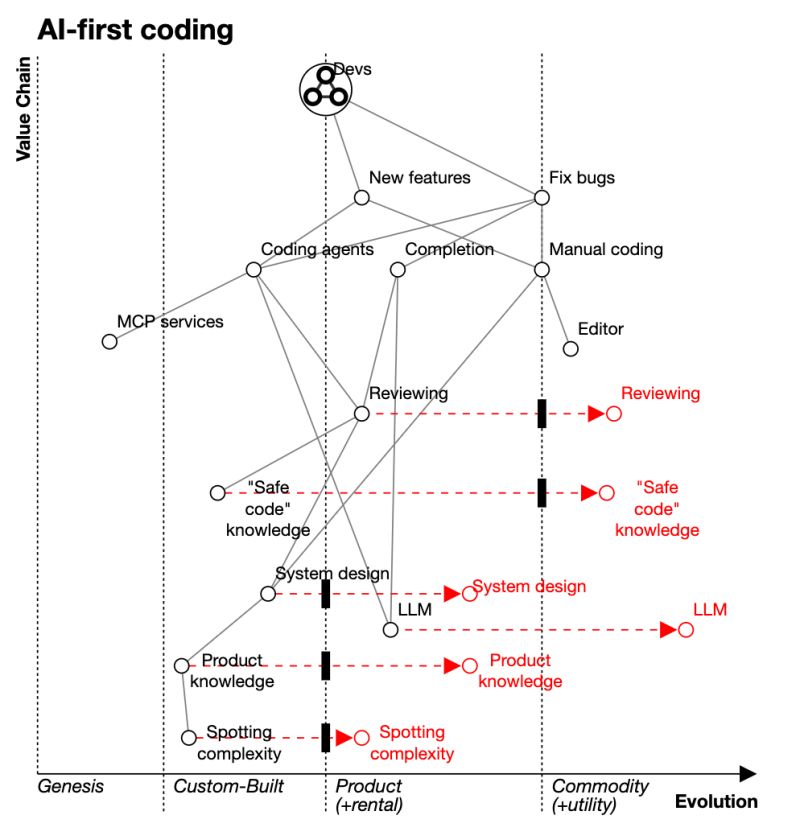
The full source for this Wardley map is available here if you want to explore or modify it.
This map reveals a fascinating shift in our industry. While coding agents and completion tools are rapidly evolving toward commodity status, certain human capabilities remain distinctly valuable.
The value chain is shifting toward these higher order capabilities that transcend code itself. In predictable environments like coding, machines will certainly excel, but in complexed environments where rules do not yet exist, humans remain unmatched. This is particularly evident in spotting complexity: that intuitive sense for recognising when requirements are straightforward versus unknowable without deeper exploration.
These human capabilities align closely with deep product knowledge and architectural intuition. Experienced engineers develop an intuitive sense for when something is not right. Such capabilities are difficult for AI to replicate because they require understanding the boundaries of our knowledge. A language model trained on known data cannot, by definition, predict what it has never seen. It cannot know what it does not know.
How Are We Going to Train the Next Generation?
One of the most thought provoking questions in this new landscape concerns how we will develop the next generation of senior engineers. As Meri Williams observed in response to my Wardley map, it is going to be interesting how we develop people into senior engineers now the traditional ways (handwriting ever more complex code but starting super simply) are likely to fall by the wayside.
This is the junior developer paradox: if AI handles the routine coding tasks that traditionally served as training grounds for beginners, how will they develop the intuition and expertise needed for higher level work?
Perhaps the answer lies in pairing with juniors and showing them how we use AI, having more conversations about higher order concepts, and guiding them as they use the tools. Pairing has always been the best way to learn code anyway.
Perhaps the aspects around production are more important than code itself, and we should start there: principles around testing, linting, deployment, security, data modelling, and layered architecture. I explore this further in my thoughts on how rigorous architectural patterns are the key to high-quality AI-generated systems1.
Maybe well structured templated repositories with generated code will become even more important. Perhaps there will be higher level blocks more at the library or repository level that we will give to AIs to stick together. Perhaps juniors will not need to learn the implementation details of these blocks.
This shift suggests several implications. Firstly, the focus of junior development must be computational and systems thinking. Rather than spending years learning language quirks and implementation details, newcomers might instead focus on understanding architectural patterns, recognising complexity, and developing product intuition.
Secondly, we may need new forms of deliberate practice. If AI handles the routine coding, we will need to create specific exercises and challenges that develop the higher order thinking skills that remain valuable.
Thirdly, the relationship between junior and senior developers will evolve. Rather than seniors primarily reviewing code, they might focus more on teaching complexity recognition, architectural thinking, and the subtle art of knowing when to trust or question AI suggestions.
The actual coding was never the job, and now it is less of the job than ever. The true value has always been in understanding what to build and why6, not just how to implement it. AI simply makes this distinction more apparent.
Can Agents Really Focus on What’s Essential?
Our experiences with AI coding assistants might reveal a fundamental limitation in how autonomous AI agents handle context. While humans, particularly experienced developers, excel at filtering vast amounts of information to identify what is truly essential, AI agents often struggle with accumulating context. They can gradually meander and lose focus as information builds up, much like a junior professional becomes overwhelmed by too much data and can feel helpless.
This is why the “reset and refine” approach often works better than letting agents iterate independently. When we provide precise, curated context upfront, we are essentially applying our human expertise in filtering and focusing on what matters. We are doing for the AI what senior knowledge workers naturally do: managing complexity by identifying and prioritising essential information.
This insight might have profound implications for the near term future of AI agents. Current implementations can hit a failure mode where they become overwhelmed by accumulated context, struggling to effectively filter and prioritise information. While agents are still learning to carefully manage their own context, and this area is rapidly evolving, for now they tend to work best within well-defined boundaries where the scope of relevant information is clear and constrained. What is clear is that understanding how to manage AI context effectively is becoming as important as understanding how to write good code.
This is true for now. However agent autonomy has rapidly advanced and continues to improve. Recent research from METR7 provides fascinating insights into this. Their study introduces a new metric: the 50% task completion time horizon, measuring how long it takes humans to complete tasks that AI models can only get right 50% of the time8. As of early 2024, best-in-class models at the time demonstrated a 50% time horizon of approximately 50 minutes - meaning humans could complete in 50 minutes what AI could only do correctly half the time. What’s interesting is the amount of independent human effort an agent can complete at a 50% success rate has consistently doubled every seven months since 2019.
The research also reveals that older AI models did poorly historically at about one minute of human work - where are lot of the most common coding tasks live. This historical limitation helps explain why coding agents have only recently become viable - newer models can now work independently for minutes at a time, enabling these tools to assist with more complex tasks.
This exponential growth suggests we might see AI capable of maintaining focus for an entire workday by 2028, and potentially for a full month by late 2029, fundamentally changing how we collaborate with these tools. We must prepare for this future where AI systems can maintain focus and context for increasingly extended periods.
Conclusion
AI is changing everything: how I code, how I write, even how I read and organise information. I would recommend that every developer and technical knowledge worker learns these tools and watches for new ones as they emerge. They are solidly technical tools for now, but that will change in future.
Using AI to write production code is not about replacing human judgment. It is about amplifying it. The imperfection of AI tools forces us to engage our System 2 thinking9. That slower, more deliberate mode of thought where we carefully reason through problems.
This cognitive engagement matters. When AI suggests code that seems plausible but feels wrong, it pushes us to articulate why. We have to engage our analytical brain rather than just accepting the path of least resistance. The process of questioning, refining and sometimes overriding AI suggestions exercises exactly the kind of critical thinking that software development demands.
If AI were near perfect, we would slip into System 1 thinking too quickly which allows more AI slop to slip through. We need to prepare for this as AI gets better.
The future belongs to developers who can effectively collaborate with AI, maintaining that careful balance between leveraging its capabilities and engaging their own critical faculties. This is not vibe coding or passive acceptance. This is thoughtful, deliberate software development enhanced by AI. It requires us to maintain our expertise in fundamentals like data modelling, state management, and security awareness even as the mechanics of code generation become increasingly automated. It requires us to find new way to teach juniors. Perhaps juniors will need more pair programming time than ever as we teach them to use AI safely.
I would like to thank Jim Downing for a great conversation that led to this version of the Wardley Map. I am also grateful to Todd Anderson, Martin Bechard, Rob Bowley,Jonathan Conway, Joshua Cornejo, Frankie Cleary, John Crickett, Jeff Foster, Sasha Gerrand, Ian Harper, Chris Hasiński, Britannio Jarrett, Josh Nelands, Slobodan Tanasić, Benjamin Tindall, Denis Turkov, Meri Williams, and many other LinkedIn commenters for their contributions to the conversation.
-
The evolution toward AI-assisted development is creating opportunities for a renaissance in software quality, but only if we maintain rigorous architectural standards. AI: The New Dawn of Software Craft explores how human-AI partnership can elevate rather than compromise software craftsmanship, emphasising the critical role of architectural patterns and disciplined development practices in an AI-first world. ↩ ↩2
-
While the promise of autonomous coding agents is compelling, the current reality involves significant infrastructure complexity and security challenges. Independent Coding Agents: The Tools Aren’t Ready examines the practical limitations I encountered when experimenting with fully autonomous development environments, from container orchestration difficulties to cost management challenges. ↩ ↩2
-
Laban, P., Hayashi, H., Zhou, Y., & Neville, J. (2025). LLMs Get Lost In Multi-Turn Conversation. arXiv preprint arXiv:2505.06120. ↩
-
Wispr Flow is an excellent voice-to-text app that transforms spoken thoughts into well-structured text. This is a referral link, but I would recommend Wispr Flow regardless because it genuinely enhances AI-assisted workflows by bridging the gap between brain dumping and structured thinking. ↩
-
Wardley Maps are a strategic tool that plots components along axes of visibility (y-axis) and evolution (x-axis) to show how practices and technologies mature over time. Learn more at Simon Wardley’s blog or read his book “Wardley Maps”. ↩
-
As AI handles more implementation details, the real value shifts toward understanding problems deeply rather than coding solutions quickly. The Job Is Not To Build explores how the most successful engineers focus on discovering what should be built and why, skills that become more valuable as AI automates the mechanics of code generation. ↩
-
The METR research paper on agent autonomy and task completion horizons can be found at https://arxiv.org/pdf/2503.14499 ↩
-
While 50% success rate is unacceptably low for most use cases, it serves as a useful benchmark for comparing model capabilities. As models improve their 50% time horizon, they also show corresponding improvements in their 80-90% success rate times, making this a reliable indicator of overall model progress. ↩
-
System 1 and System 2 thinking are concepts developed by Daniel Kahneman in his book “Thinking, Fast and Slow”. System 1 is our intuitive, fast thinking mode. System 2 is our deliberate, slow thinking mode. ↩

High-res version available to newsletter subscribers