I have been building my own workflows, working in tandem with AI, for over a year now. Like many others, I started by giving Claude Code access to my existing Obsidian vault, and did a lot of things ad hoc. Then I installed OpenClaw, and promptly removed it again. So that I could reach everything remotely, I rented a VPS to run Claude Code from my phone, and started scheduling tasks. I then built my own project review board to bring GTD to my work, and moved to Telegram bots and several agents with small remits to organise the work further, which I am still experimenting with.
I have built a lot of stuff. A lot of it even works.
However, many of the AI systems that AI has built for me are no longer useful. Some of it has rotted, or is less useful than before, but still runs. It costs me time to review (though not enough to make me turn it off) and a tiny but growing token tax.
Plenty of companies I speak to have the same issues, multiplied. Broken workflows are a far greater burden when they infect an entire organisation, and people are trying to get to grips with them and organise them.
In all of this I have realised that there is no shared vocabulary yet for the AI routines that run my life and work. We hear people say “I have automated my business using AI”. But how do they keep it going? How do they know where their data is? How can we even describe everything they are running? We generate endless artefacts and share them with others, yet it is hard to know what data drove them, or whether other people are even allowed to see them.
Worse, all this stuff we have built is tied up in the tools, and it is hard to separate the two, even for AI: scheduled tasks, artefacts, Claude Cowork, shared brains, Codex sites, Claude Docs, Google Docs, scattered Notion connectors, Dots, OpenClaw, Hermes, and the list goes on. No wonder we are still very much at the prototype stage of these tools (see inset).
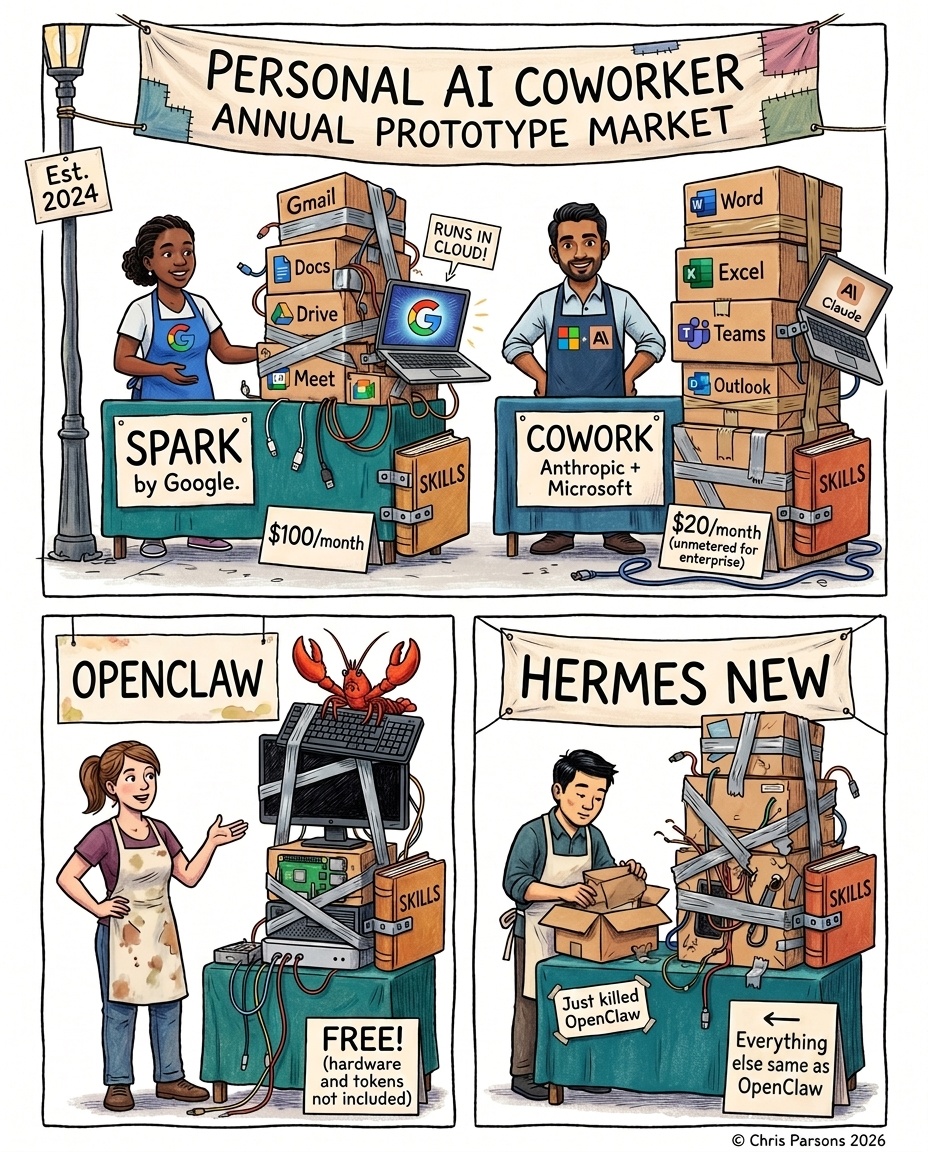
If we cannot describe the work separately from the tools, how can we move it to the best platform? How can we replace one piece with a better tool or harness, or improve a single prompt? Are we doomed to having AI wipe and rebuild our setup every time something new and shiny comes out?1
Our workflows are also too tied to the AI that creates them. It is often useful to have AI running within a workflow (although less often than we would think - see below). Even the flow of work is sometimes decided by an AI loop, which means one day you are asked for a critical step, and another day you are not.
The Three Layers of Work
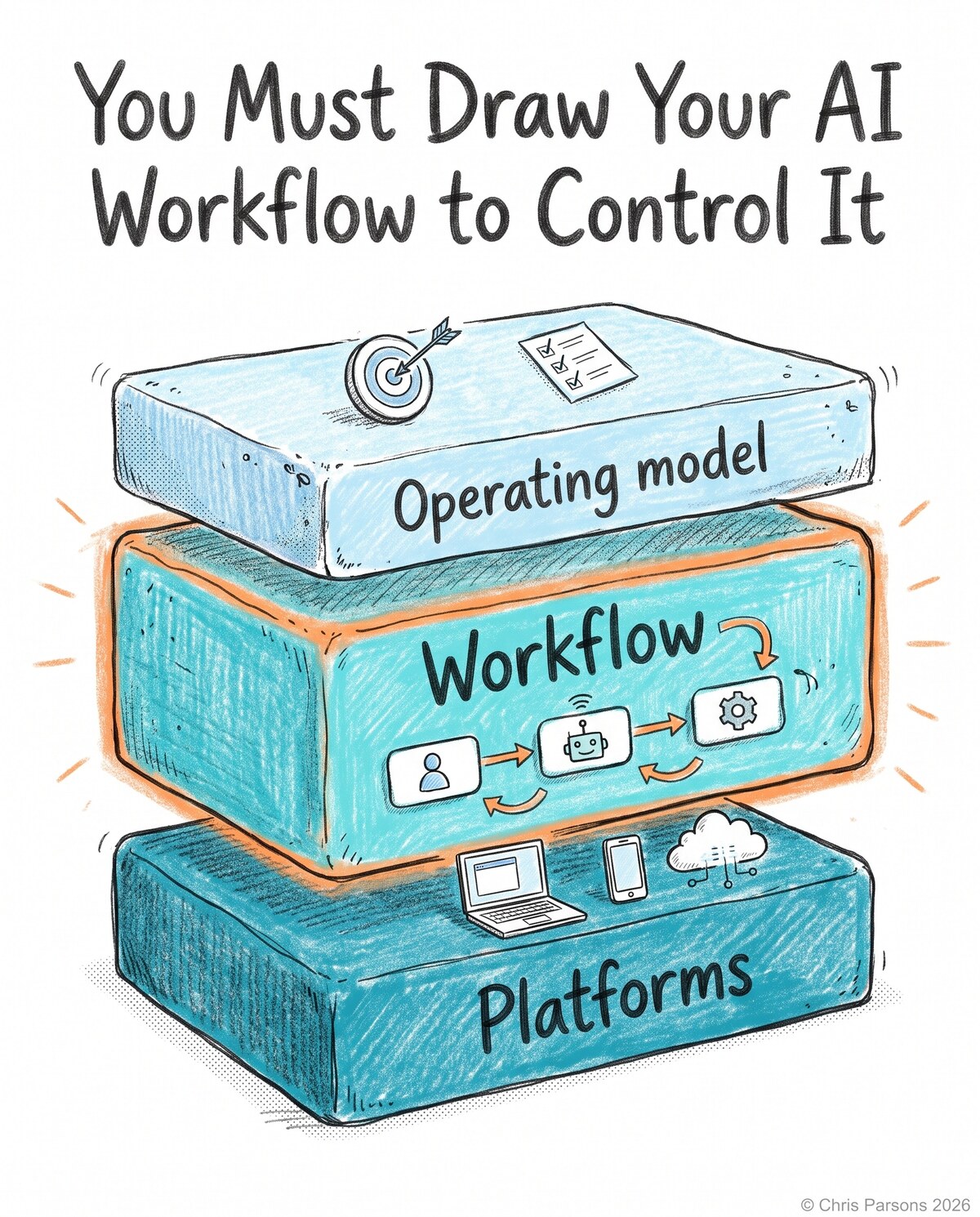
The first step is a layered set of terms for what we are talking about. There are three layers in any AI system that does work for us:
- The operating model: what the work is, and how it is organised. For example, a company’s mission, goals, projects and action items, right down to regular meetings and who is given which task.
- The workflow: the steps that work goes through to get done, driven by the operating model.
- The platforms: the combination of AI systems, harnesses, models and programs that carry out the work.
This all existed before AI. An operating model for personal productivity might be Getting Things Done, which I first wrote about in 2010. A workflow might be the process of planning a company offsite, and the platforms might be Notion, Word documents, messaging systems or email. Work was delegated between people within the process.
The difference now is that our work is leaking out of these layers. AI takes on parts of this work in different platforms, hung together loosely by MCP connectors. It saves time, but we lose some clarity about which information belongs where. Many of these workflows used to happen solely inside our own heads. Now more of them exist in the open, in new tools like Codex, Claude Code and Cowork. People are learning to delegate all over again, and in doing so are creating ad hoc “shadow agents” that work for us but do not work without us. That makes us the bottleneck, and limits AI’s potential to help transform our organisations.
To get to grips with how AI works for us, we must remind ourselves of these layers and be more explicit about how we organise ourselves and our work, so we can take full advantage of AI and spot inconsistencies.
An example from my consulting business:
- Operating model: every client engagement is a project, and anything that goes out in my name waits for my yes.
- Workflow: an incoming client email updates the engagement’s project in my shared knowledge vault. A quick reply is drafted, and I tweak it and send it. My changes to the reply are noted for next time.
- Platforms: Gmail, Markdown files, and a scheduled job that calls GPT-6 Sol through the pi harness.2
Today I want to cover the middle layer: the workflow. The operating model is designed to accommodate AI but has little to do with it: it is how work is organised, whoever or whatever does it. The platforms are all designed to work with AI in their own slowly converging but non-standard ways. Plenty of the workflows they end up running also have very little to do with AI. Here we will describe workflows apart from the platforms that run them, so that we can standardise them, and in future even make them portable.
Introducing AWML
To help describe workflows, I have come up with AWML, the Agentic Workflow Modelling Language. It describes a basic flow, with two lenses you can apply to draw different diagrams: a security view and a platform view.
You write AWML as a short text file, and a small command-line tool turns it into a diagram through either lens. Every box is one of a few parts: a trigger that starts the work, a step by a 👤 person, a 🤖 AI or ⚙️ code, the notes a step reads and writes, a connector into an outside service, a surface where people interact with the work, and an outside action that changes something in the world.3
Note that there is no concept of an agent in AWML - an AI might act as an agent, depending on the provider, but the term is not precise enough.
Each step shows who decides it, by its colour and an emoji. An AI makes a judgement call that you need to inspect and improve. A person is the slowest step of all, so you want one only where it matters. A step can also name its operation, the kind of work it does: bring in, sort, learn, prepare, check, reflect, draft, do or answer, or other for anything else. Each has one thing it must never do, such as a draft never sending, and the tool checks those rules. The AWML readme gives the question each one answers.
Carrying on the client email example from earlier, drawn for a fictional consultant:
---
config:
  theme: default
  flowchart:
    useMaxWidth: false
    subGraphTitleMargin:
      top: 6
      bottom: 30
---
flowchart TB
  subgraph private["private: the consultant"]
    direction TB
    mailbox{{"The consultant's mailbox"}}
    weekdays(["Weekdays 07:00"])
    bring("<small style='color:#3d434f'>⚙️ 📥 bring-in</small><br>Bring in the inbox")
    rules("<small style='color:#3d434f'>⚙️ 🗂️ sort</small><br>Sort by rule: is the sender a client?")
    edit("<small style='color:#3d434f'>👤 🛠️ do</small><br>Edit the reply and send it")
    send>"Send the reply: Ask"]
  end
  subgraph business["business: the consultant, an associate"]
    direction TB
    engagements[("The business's engagements")]
    choose("<small style='color:#3d434f'>🤖 🗂️ sort</small><br>Choose the engagement the email belongs to")
    learn("<small style='color:#3d434f'>🤖 🧠 learn</small><br>Update the engagement's project with what the email says")
    project[("The engagement's project")]
    draft("<small style='color:#3d434f'>🤖 ✏️ draft</small><br>Draft a reply")
    drafts[("Drafts")]
  end

  weekdays -.-> bring
  mailbox --> bring
  bring --> rules
  rules ==>|"standing rule: a client's email"| choose
  engagements --> choose
  choose --> learn
  learn --> project
  project --> draft
  draft --> drafts
  drafts ==>|"the consultant takes the reply"| edit
  edit --> send
  send --> mailbox
  classDef trig fill:#fbe1ee,stroke:#a33a74,color:#16171b
  classDef ctx fill:#e2eef9,stroke:#3d6fa3,color:#16171b
  classDef con fill:#eceef2,stroke:#5d6472,color:#16171b
  classDef surf fill:#ffffff,stroke:#2a2d35,stroke-width:1.5px,color:#16171b
  classDef out fill:#fde4dc,stroke:#b5532f,color:#16171b
  classDef ai fill:#cdd3fb,stroke:#3b4bb0,color:#16171b
  classDef rule fill:#c4e3d1,stroke:#2b7a4f,color:#16171b
  classDef human fill:#f7d79a,stroke:#9a6100,color:#16171b
  classDef uml fill:#16171b,stroke:#16171b,color:#16171b
  classDef gap fill:#ffffff,stroke:#8a93a3,stroke-dasharray:4 3,color:#6b7280
  class weekdays trig
  class engagements,project,drafts ctx
  class mailbox con
  class send out
  class choose,learn,draft ai
  class bring,rules rule
  class edit human
  style private fill:transparent,stroke:#8a93a3,stroke-dasharray:6 4,color:#3d434f
  style business fill:transparent,stroke:#8a93a3,stroke-dasharray:6 4,color:#3d434f
The security view draws each scope, a group of people who may see something, as a dashed box. A line that crosses out of a box shows content to more people. That is publishing to a wider audience, and it is drawn as a thick line. Here, a standing rule lets a client’s email into the business, and the consultant takes the reply back into their private mailbox to send it. We can check automatically that a person has approved each publishing step, if our operating model demands it.
Only half of these steps need AI.
When I drew six of my own workflows this way, I immediately found a slew of issues: a job writing into my journal that should only ever have linked to it, and posts being scheduled on a yes that was never recorded anywhere.
The specification, the tool and a set of small examples are on GitHub at chrismdp/awml. The tool also checks each file for mistakes, such as a line to a part that does not exist, and builds a page you can share.
Workflows Run on Platforms
AWML describes the workflow. Any platform with the right capabilities can run it: a scheduled job on a server, a chat bot, a managed agent service, or even a person with a checklist. A platform brings its own surfaces, its own harness, the program that runs each step and calls a model, and its own models, and often its own triggers too. A model on its own is not a platform. In practice, most of us cobble several platforms together, because no single tool can yet run a whole agentic workflow.
Why not draw it all as one diagram? Because each lens hides what the other shows. The security view shows the scopes, and where content crosses a permission boundary. The platform view shows where each part runs, and how the platforms fit together.4 Here is the same client email again, through the platform view:
---
config:
  theme: default
  flowchart:
    useMaxWidth: false
    subGraphTitleMargin:
      top: 6
      bottom: 30
---
flowchart TB
  subgraph cowork["Claude Cowork, Mac mini"]
    direction TB
    weekdays(["A scheduled task, weekdays 07:00"])
    bring("<small style='color:#3d434f'>⚙️ 📥 bring-in</small><br>Bring in the inbox")
    rules("<small style='color:#3d434f'>⚙️ 🗂️ sort</small><br>Sort by rule: is the sender a client?")
    choose("<small style='color:#3d434f'>🤖 🗂️ sort</small><br>Choose the engagement the email belongs to")
    learn("<small style='color:#3d434f'>🤖 🧠 learn</small><br>Update the engagement's project with what the email says")
    draft("<small style='color:#3d434f'>🤖 ✏️ draft</small><br>Draft a reply")
  end
  subgraph files["Synced Markdown notes"]
    direction TB
    engagements[("The business's engagements")]
    project[("The engagement's project")]
  end
  subgraph phone["The consultant's phone"]
    direction TB
    edit("<small style='color:#3d434f'>👤 🛠️ do</small><br>Edit the reply and send it")
  end
  subgraph gmail["Gmail"]
    direction TB
    mailbox{{"The consultant's mailbox"}}
    drafts[("Drafts")]
    send>"Send the reply: Ask"]
  end

  weekdays -.-> bring
  mailbox --> bring
  bring --> rules
  rules ==>|"standing rule: a client's email"| choose
  engagements --> choose
  choose --> learn
  learn --> project
  project --> draft
  draft --> drafts
  drafts ==>|"the consultant takes the reply"| edit
  edit --> send
  send --> mailbox
  classDef trig fill:#fbe1ee,stroke:#a33a74,color:#16171b
  classDef ctx fill:#e2eef9,stroke:#3d6fa3,color:#16171b
  classDef con fill:#eceef2,stroke:#5d6472,color:#16171b
  classDef surf fill:#ffffff,stroke:#2a2d35,stroke-width:1.5px,color:#16171b
  classDef out fill:#fde4dc,stroke:#b5532f,color:#16171b
  classDef ai fill:#cdd3fb,stroke:#3b4bb0,color:#16171b
  classDef rule fill:#c4e3d1,stroke:#2b7a4f,color:#16171b
  classDef human fill:#f7d79a,stroke:#9a6100,color:#16171b
  classDef uml fill:#16171b,stroke:#16171b,color:#16171b
  classDef gap fill:#ffffff,stroke:#8a93a3,stroke-dasharray:4 3,color:#6b7280
  class weekdays trig
  class engagements,project,drafts ctx
  class mailbox con
  class send out
  class choose,learn,draft ai
  class bring,rules rule
  class edit human
  style cowork fill:#e3ebfa,stroke:#b9c8e8,color:#16171b
  style files fill:#fbe9df,stroke:#ecc7b2,color:#16171b
  style phone fill:#efe6fa,stroke:#d3c2ea,color:#16171b
  style gmail fill:#fbf3d9,stroke:#e8d9a6,color:#16171b
The same workflow across four platforms: Claude Cowork on a Mac mini, Markdown notes synced to the laptop and the Mac mini, Gmail, and the consultant’s phone.
The platform view is the one that changes when you change tools. Move the notes from Markdown files to Notion, or the scheduled task from Claude Cowork to a managed agent, and the boxes stay the same, just in different blocks. Wherever the flow crosses from one platform to another, you need the right connector in place, or someone has to copy and paste.
What This Gives Us
- Auditing: you can see where information moves from private scopes to public ones, and across tools. You can also see how much of the work is automated, and where the workflow saves time.
- Hill climbing: once you can see each step as a box with a known input and a known output, you can improve it on its own. Keep a set of past cases for a step, score its output against what you would have produced yourself, try a different prompt or a different model, and keep the change only if the score goes up. Every review is a label for the step before it: each yes, each no and each edit tells you how that step is doing. You can only hill-climb like this if you understand the workflow, and if your platform lets you see and change one step without touching the rest. Most of today’s tools do not.
- Portability: the workflow stays the same when a platform changes, so you can choose the best platform for each part, and move a part when something better comes along. In future, I would love to take an AWML file and generate something like a Terraform plan from it5: a repeatable description of how a workflow fits onto a particular platform. Moving a workflow would then mean applying a different plan, rather than rebuilding it by hand.
- Efficiency: the same patterns of steps turn up again and again, so each can be optimised once. A future platform could capture evaluations for every step automatically, and rerun them on different models to find the cheapest one that still does the job well.
I hope platforms that conform to the specification will spring up, so that people can move their work between them as they see fit, and so that the platforms provide the security guarantees these designs badly need.
Is this useful to you? If you would like to join the conversation, please open an issue on GitHub.
-
The shapes are borrowed from the activity diagram in the Object Management Group’s UML specification. ↩
-
Part of the inspiration came from Claude Managed Agents, where the environment an agent runs in is set up separately from the agent itself. Once the environment is its own thing, you can ask what it can reach: everything it holds, and every host it can talk to. AWML’s platform view asks that question of every platform in a workflow. Anthropic’s Claude Managed Agents quickstart shows an environment created on its own and then used by an agent’s sessions. ↩
-
HashiCorp’s Terraform describes infrastructure as code, and applies a plan to make the real thing match it. ↩