I used to think the big AI transformation would be about embedding AI into products. The transformation that matters right now is people using AI to do their own work, across their entire workflow.
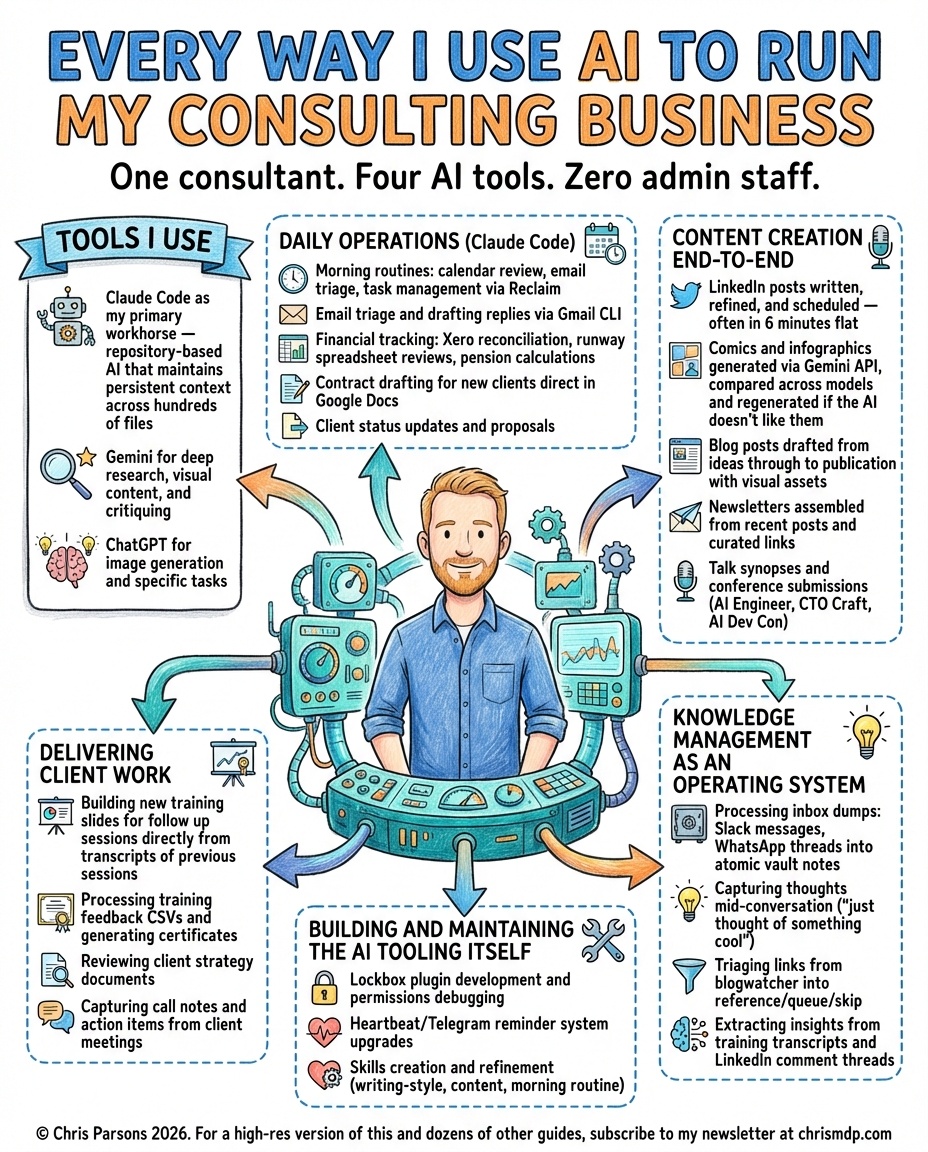
On 5 March 2026, I gave a webinar showing the full picture of how I use AI to run my consulting business: 44 custom skills that handle everything from morning planning to slide generation to strategic thinking. Three developments over the last six months made this possible, and they have changed my working life more than anything since I first started programming.
Three Changes That Matter
The first is MCP, which connects AI tools to everything else on your computer: email, calendar, Google Drive, spreadsheets. The second is AI that runs on your machine rather than trapped behind a website. Claude Code sitting on my operating system, reading and writing files, running shell commands, is far more capable than any chatbot. The third is that the models themselves crossed an inflection point around the end of November. Claude Code with Opus 4.6 understands poorly worded dictations, generates better code, and reasons about complex multi-step workflows in ways that were not possible six months ago.
What Skills Are
Anthropic introduced skills as chunks of knowledge you make available to AI on demand. I compared it to The Matrix: Neo does not know kung fu, but he knows he does not know kung fu, and he can pull in the knowledge when he needs it. A skill is a markdown file that teaches Claude Code how to do a specific part of your job. Some are simple style guidance, others are multi-phase workflows with scripts, semantic search, and feedback loops.
The key difference from custom GPTs is that skills are interconnected. They load together, combine freely, and build on each other. My strategic thinking skill can pull in my writing style skill, which can trigger my slop checker, which can hand off to my image generation skill. Skills are a network, and that is what makes them powerful.
Content Without the Content Treadmill
The first skill I demonstrated was Content, which manages my entire LinkedIn pipeline. I post daily, and without this skill I would spend most of my morning on it. Instead, I dump a half-formed idea and the skill loads my content strategy, searches my vault for related concepts using CK semantic search, checks what I have posted recently, and generates a content plan. It knows my two-pillar strategy, my audience rules, my posting schedule.
A separate service pulls engagement data from LinkedIn into my vault, and the Content skill analyses which posts performed well and why. During the webinar it told me that historical metaphors are my best-performing format, and suggested finding one that challenges leaders’ thinking about AI adoption. That kind of data-driven content adjustment used to require a social media manager. Now it happens inside a single conversation.
Slides From a Single File
The slides for this webinar were generated by AI on the morning of the session. The Slides skill works from a markdown outline where each slide has a heading, topic, illustration description, and presenter notes. The illustration descriptions are fed to Gemini’s image generation API through a custom Images skill that contains specific prompts for my brand colours, design style, and different slide types. The AI evaluates each generated image before presenting it and often improves the result automatically.
The output goes straight into Google Slides via a command-line tool that handles the Google Workspace API. Presenter notes are extracted automatically. If a slide does not work, I regenerate just that one. The whole deck, from outline to finished presentation, took about two hours.
AI That Asks Questions
Strategic Thinking interrogates your thinking until the strategy is sharp, using Richard Rumelt’s framework from Good Strategy Bad Strategy to detect fluff and push for specifics.
I demonstrated it with an engineering challenge: cutting a deployment cycle from two weeks to daily. The AI immediately identified that as a goal, not a strategy, and started digging into the underlying obstacles. Is it a manual QA bottleneck? A release approval process? Fear of breaking production? It is Socratic, not generative, and it knows my patterns well enough to call out when I am chasing a shiny object instead of addressing the real constraint.
The Skill That Builds Skills
The most important part of any agile process is the retrospective. The same principle applies to working with AI. My Retro skill analyses the entire conversation for moments where I corrected the AI, disagreed with its approach, or wasted time on a dead end. It then proposes durable improvements: a new rule in a skill file, a pattern to add to project instructions, a workflow to restructure.
This is how I went from zero skills to 44: using AI, noticing what went wrong, and running a retro that writes the lesson into the system. A skill typically takes six to twelve iterations to get right. Each iteration is a 1% improvement that compounds over time.
Writing your own skills matters. Downloading someone else’s carries risks, from prompt injection to simply not matching how you work. The retro discipline is how you end up with an AI assistant that knows your specific workflow, preferences, and patterns.
Getting Started
You do not need 44 skills. You need one repetitive task, one AI session, and the discipline to run a retro afterwards. Pick something you do every week: content, email triage, planning, whatever it is. Use AI to do it. Pay attention to where it goes wrong. At the end, write down what you learned in a file that persists.
Next time you do that task, AI starts from a better place, and the skills compound from there.
Tools and Resources
- Claude Code - the AI coding tool that runs on your machine
- MCP (Model Context Protocol) - connects AI tools to your workspace
- CK semantic search - embedding-based codebase and vault search
- Skills are Claude Code’s Secret Weapon - my guide to building and using skills
- Good Strategy Bad Strategy by Richard Rumelt - the framework behind the Strategic Thinking skill
Key Takeaway
Every skill you write, every retro you run, every piece of workflow knowledge you encode makes the next session more capable than the last.
The gap between “AI as chatbot” and “AI as business infrastructure” is closing fast, but only for people who invest in context. Every skill you write, every retro you run, every piece of workflow knowledge you encode makes the next session more capable than the last. Anyone can start with one task and iterate from there.
One Thing to Try This Week
Pick one task you do every week that drains your energy. Open Claude Code (or whichever AI tool you prefer), do the task with AI, and write down every moment where you had to correct it or it made a wrong assumption. Save those observations in a markdown file alongside your project. Next time you do the task, paste that file into context first. You have just built your first skill.
Previous Webinars